
During SAP Activate’s Explore phase and the Fit-to-Standard workshops, consultants capture dozens of “requirements,” each meant to articulate a specific business need. Without clear formulation standards, a few weeks later no one is quite sure what the original request actually meant. This undermines the workshop’s primary goal: validating solution fit.
The real pain - inconsistency
In SAP programs, requirements that are vague or inconsistently written become a main source of unnecessarily lost effort. When two workstreams describe the same business need in different words, duplication multiply, which may lead to unnecessary testing of the same functionality or cause change requests.
For example, when a requirement says “system should support automatic approval” no one will know what support actually meant when they discussed it during a workshop. You cannot test such a requirement later.
Ambiguity has measurable cost
Each unclear requirement multiplies into unnecessary discussions, rework, and test defects. Misunderstandings accumulate silently until they become visible during the first cycle of testing, when the system finally reveals whether the requirement was truly met.
The true risk of Requirements Management is not the absence of requirements documentation, but the lack of consistency in how requirements are formulated.
Not having the requirement formulation standards, which are recommended by SAP Activate, is one of the major sources of rework and wasted effort. When requirements are written in different formats and tones, they cannot be easily classified, compared, or reused.
Why clear formulation matters
SAP Activate’s agile approach is built on the idea that requirements evolve. But they must be clear right from the start as the backlog entry, so that they can be reviewed, classified, and approved later. Clarity does not mean rigidity. It means writing requirements so they can be discussed, prioritized, tested, and traced - even as they may change later.
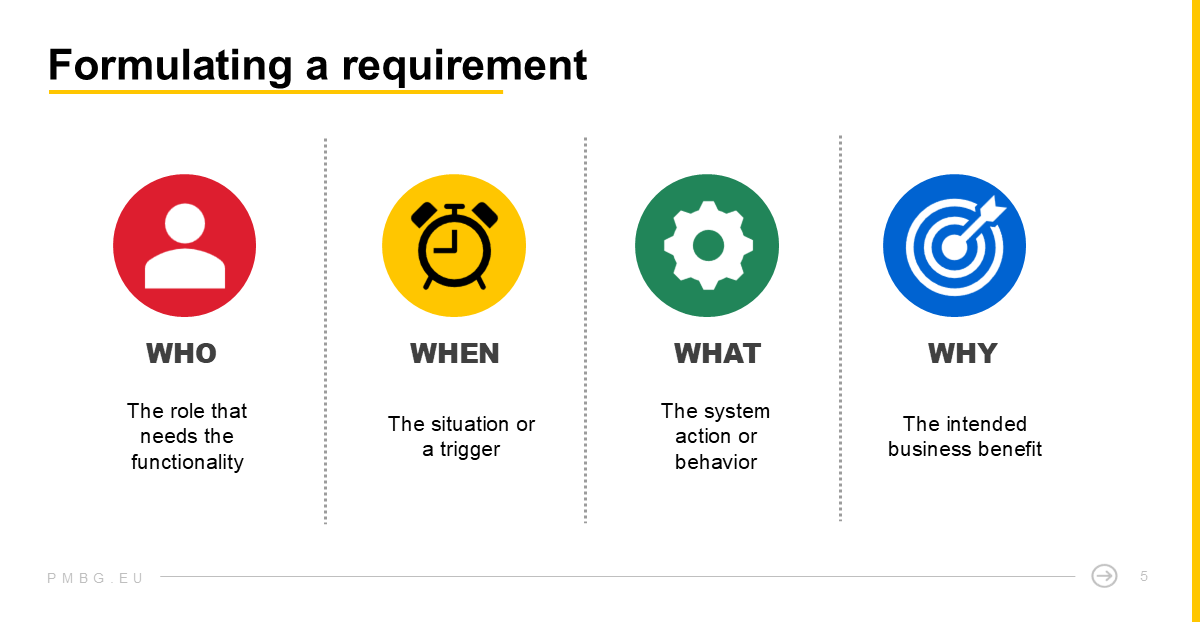
A well formulated requirement contains four elements in one short sentence:
- Who – the role that needs the functionality
- When – the situation or trigger
- What – the action or system behavior
- Why – the intended business benefit
When these four parts are present, the requirement becomes verifiable. It can be confirmed during testing and explained during audit reviews. More importantly, it can be reused across teams and releases because it is self-contained and unambiguous.
The right format for SAP projects
SAP’s Agile method proposes the familiar User Story format: “As a [role], I want [feature], so that [business value].” In practice, this structure is often too generic for configuration and testing.
A better pattern for SAP requirements adds context and system behavior:
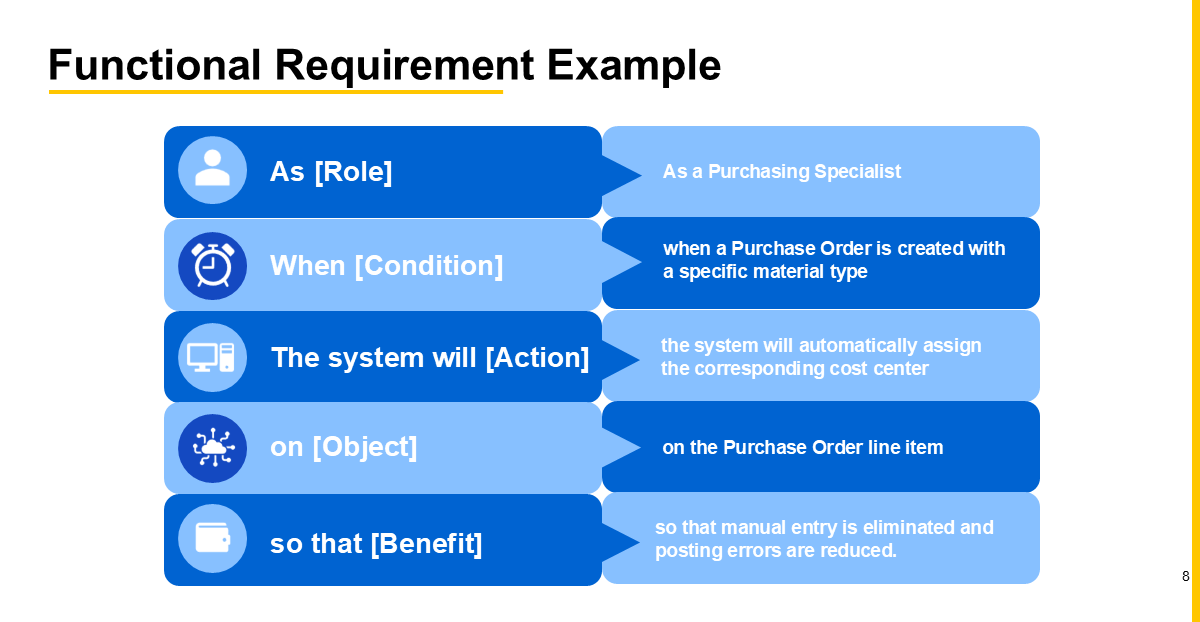
As [Role], when [Condition], the system will [Action] on [Object] so that [Benefit].
This sentence looks simple, but it solves three common problems:
- It describes the trigger (when), which links to a real process step.
- It defines the system reaction (will [Action]), which makes the behavior testable.
- It keeps the business benefit explicit, which ties it back to value and approval.
This version includes all four elements: who, when, what, and why. Anyone reading it should understands both the intent and the expected outcome.
Adding a “How to Demo” section
A practical way to make requirements even clearer is to include a short “How to Demo” note directly under the description. This is not a full test case but rather a quick outline of how someone would prove that the requirement works. This serves as a draft for formal test cases and ensures that requirements can be verified during Activate’s test preparation phase
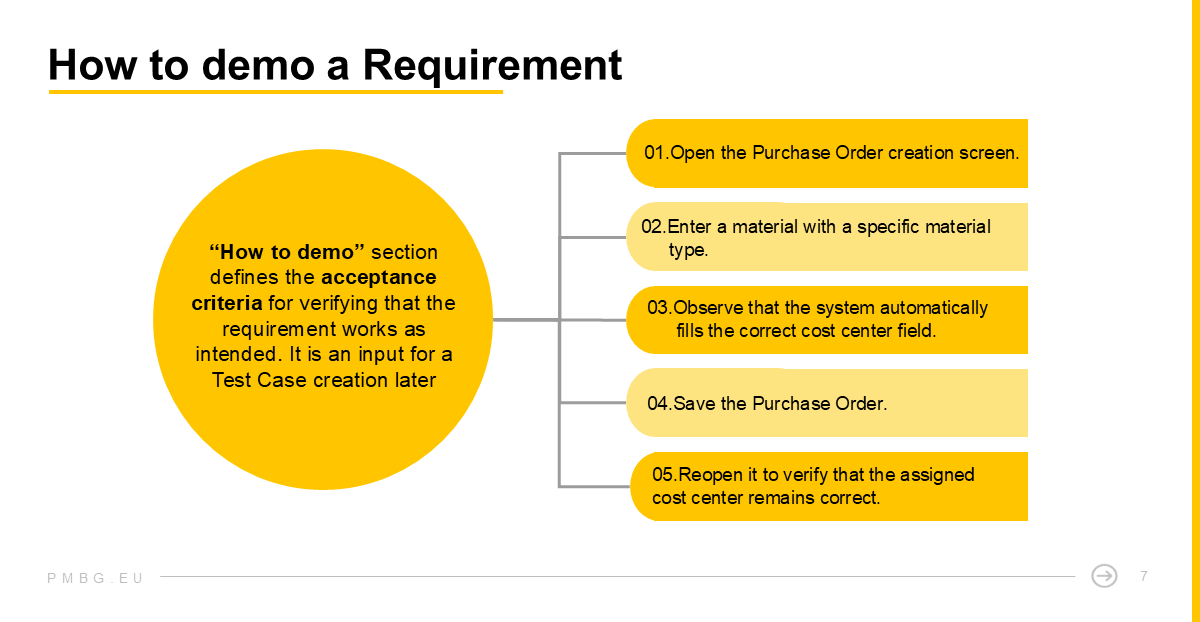
This small “How to demo” section acts as an early test-case draft. It helps reviewers visualize expected behavior and gives testers a ready starting point for building the formal Test Case later. In larger projects, these demo notes become a lightweight bridge between requirement authoring and structured testing, keeping intent, behavior, and verification tightly connected.
Finding the right level of detail
A well-written requirement should guide the Realize phase. Too much detail turns it into a mini-functional specification; too little makes it meaningless. The right level of abstraction sits between business intention and technical configuration.
When many team members are involved in requirements formulation, duplication can easily occur. Similar needs appear in different modules, often under different wording. To prevent this, each requirement should reference its related SAP Best Practice Process represented by an approved Scope Item. This simple linking helps identify overlaps early and supports reuse across workstreams.
From quick notes to refined requirements
In line with SAP Activate’s iterative principle, requirements may first be recorded in simple terms and refined later during backlog reviews and work package definition. What matters most in that moment is to capture the intent in a simplified form and then refine it later.
For example: “Add a process step for automatic credit check approval before delivery creation.” - classified as GAP
Such a note still has value. During later review, typically when preparing the related Work Package, the requirement can be reformulated to the full standard:
As a Sales Manager, when a sales order is saved and the customer exceeds the credit limit, the system will block delivery creation on the delivery document so that only approved orders can ship.
This two-step approach keeps workshops efficient while ensuring that every requirement ultimately meets the agreed structure before review, approval, and test preparation.
How to make this standard work in Jira?
Formulation discipline is easier to maintain when supported by a tool. In Jira, you can create an automation rule that pre-populates the Description field of each new Requirement with a Activate-style structured template.
In the template, you can use a table to make the content easier to follow. Each author then only needs to fill in the blanks. This keeps every requirement standardized.
For simplicity, below the requirement you can add a simple list with the ‘How to demo’ steps.
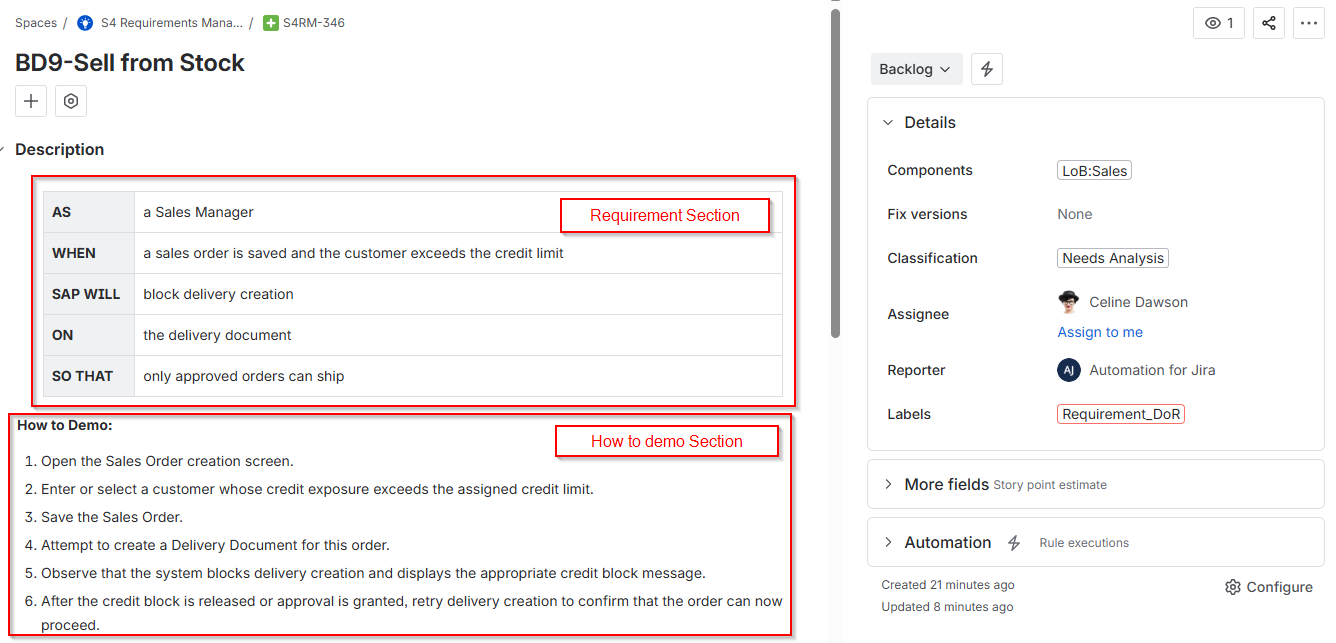
R2D ALM for Jira - Requirement Work Item screen view. Right-click the image for a more detailed view.
Why it’s worth the effort?
A requirement is not a transcript of a workshop discussion. It is a helpful SAP governance standard that supports the SAP delivery lifecycle.
Teams that adopt this standardization rule quickly notice tangible benefits:
- Requirements become easier to review and approve.
- Test cases can be linked directly and generated faster.
- Cross-team understanding improves, because every sentence follows the same logic.
Formulation discipline may feel like a big effort, but it pays back throughout the project lifecycle. Clear requirements accelerate testing, improve governance, and reduce rework.
