
Is it your day in SAP project life?
Your SAP project is in the middle of Fit-to-Standard analysis and workshops, your Requirements Backlog grows quickly, requirements are flowing in from all teams, but it’s impossible to see what matters most or what type of work is hiding behind the summary and description.
If that sounds familiar, your project might be missing the structured requirement classification discipline recommended by SAP Activate. Without this approach, the requirements backlog turns into a flat list, where priorities will be hard to assign and some of the expected outcomes will not be properly documented (I mean - detailed enough).
With structured classification, it becomes clear what type of outcomes we’re delivering and what kind of documentation and work is actually required. It enables credible estimation, release wave planning, and test coverage without the need to re-explain the project every week.
What is Requirement Classification?
Classification provides a structured way to label requirements so they can be grouped, prioritized, tracked, and reported consistently across both functional and technical workstreams. Together with formulation standards (read about them here), it keeps your requirements backlog clean and actionable for delivery and status reporting.
Every requirement should be labeled along two dimensions:
1️) LEVEL - hierarchy - shows where the requirement sits in the project - higher strategic level or lower detailed level.
2) TYPE - nature of work: signals what kind of effort is needed to deliver it.
The Dual Classification Model — Levels & Types
Levels hierarchy - reflects the “zoom” level:
- L1 – High-Level Business Requirement: The “why” - what business value or capability must be achieved.
- L2 – Process-Level Requirement: The “what” - process activities or steps that bring the business outcome to life.
- L3 – Functional Requirement: The “how” - concrete system behaviors, validations, or interactions that enable the process step. At this level, SAP Activate recommends requirements be formulated so they are traceable and testable.
Types - nature of work - reflects the solution pathway:
- FIT: Standard SAP functionality meets the need as is; adopt standard SAP.
- GAP: Missing functionality requiring additional configuration or enhancement.
- EXT (Extension / WRICEF): Technical work — interfaces, reports, conversions, enhancements, forms.
- NFR (Non-Functional Requirement): Qualities such as performance, security, compliance, or usability.
Combine both dimensions and you’ll see your full solution scope - how much fits standard SAP, which areas need only configuration, and where technical extensions or non-functional demands will influence delivery. This will help later with accurate effort estimation and release governance.
From Discover to Explore: how requirements detail changes
Discover Phase: Requirements are collected as high-level outcomes or business goals mapped to solution scope. They are articulated as value drivers and not yet detailed as process or system requirements.
Prepare Phase: Refined and agreed high level requirements are turned into scope statements and acceptance criteria. They become part of the project charter, forming the project baseline.
Explore Phase: Time to dive in. Now, during the Fit-to-Standard workshops, the team validates which SAP Best Practices satisfy business needs (FIT), pinpoint deltas (GAP, EXT/WRICEF, NFR), and detail process-level or functional requirements for each business activity. The goal is not to restate strategic goals but to clarify how each is realized in process terms.
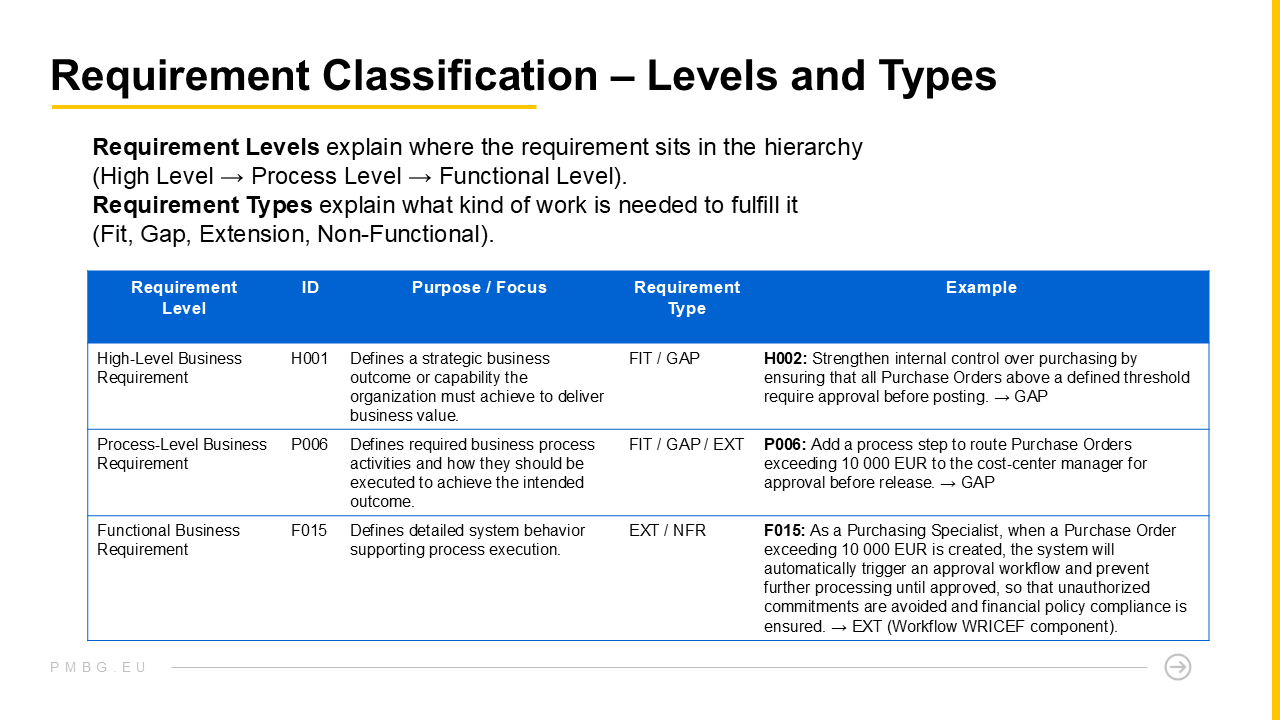
Requirements refinement example
Here is a quick example to demonstrate how the level of details changes between requirement levels. These changes are the result of iterations.
High Level (L1): “Ensure that customer credit exposure is controlled during the order-to-cash process to minimize financial risk and enforce company credit policy.”
Process Level (L2): “Add a process step to validate customer credit before order confirmation, ensuring that orders exceeding credit limits are identified and stopped before delivery or invoicing.”
Functional Level (L3): “As a Sales Representative when a Sales Order is saved for a customer whose credit exposure exceeds their credit limit the system will automatically block the Sales Order and display a message indicating the credit limit breach so that financially non-compliant orders are prevented from further processing and company credit policy is enforced.”
Depending on SAP coverage, requirement form this example could be a GAP (needs configuration) or an EXT (custom validation).
When a Level 3 requirement is formulated using an agreed template and properly classified, it becomes much easier to estimate the required effort and remains traceable from the very beginning all the way through deployment.
What about Non-Functional Requirements?
It may seem counterintuitive, but SAP methodologies - including Activate and Focused Build - classify most Non-Functional Requirements (NFRs) at the same (functional) level as detailed system requirements. While their name suggests they are “non-functional,” they describe qualities that apply to specific system functions, such as performance, security, or usability. In practice, they sit at the same level of detail as functional requirements, because they can be specified, tested, and verified against system behavior.
For example:
“The system shall process 10 000 purchase order lines within 60 seconds under normal load conditions.” “User data shall be stored only within EU-based data centers.”
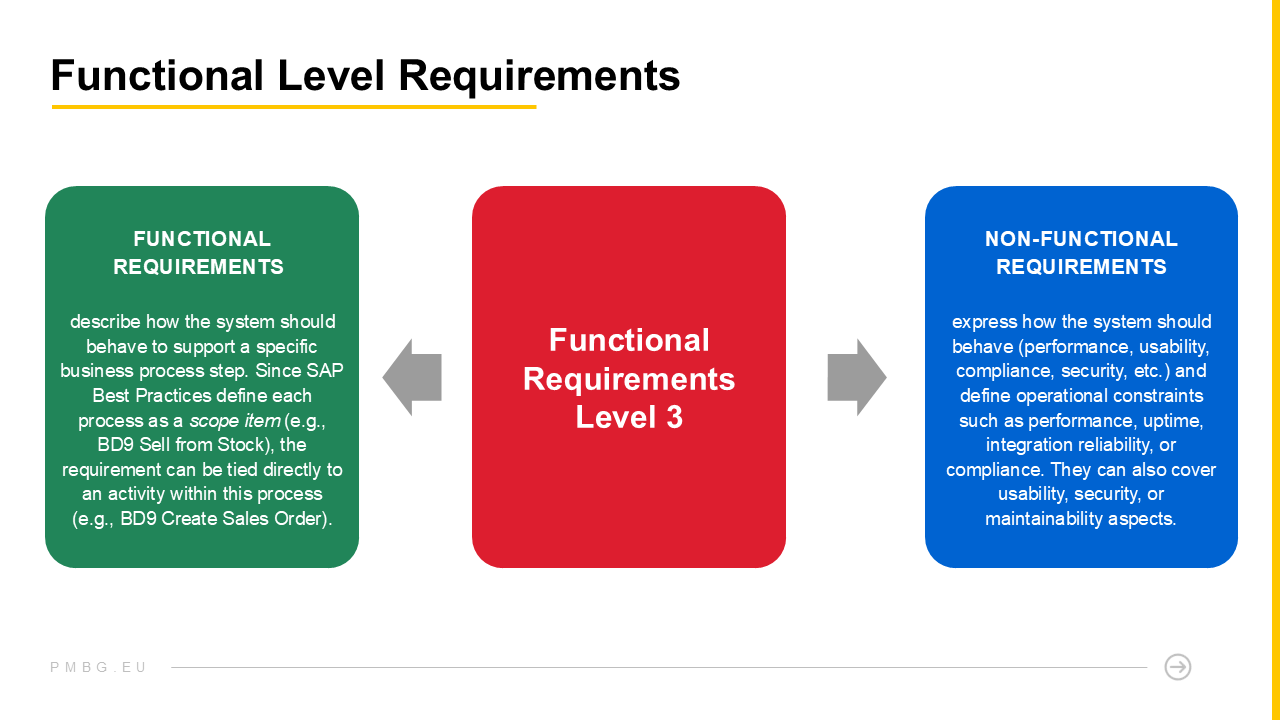
The difference between functional and non-functional requirements (type) on the functional (level)
Bringing classification to practice in Jira
The flexibility of Jira allows you to capture more than just a requirement’s name and description. You can also collect structured metadata for governance and reporting. You are not limited in customizations like in SAP native tools.
Possible Jira configuration:
- Add custom fields to record key attributes such as Requirement Level (High-Level, Process-Level, Functional) and Requirement Type (FIT, GAP, EXT, NFR, etc.).
- Configure these fields as drop-down lists so that users must select a defined value, ensuring consistent classification across all teams.
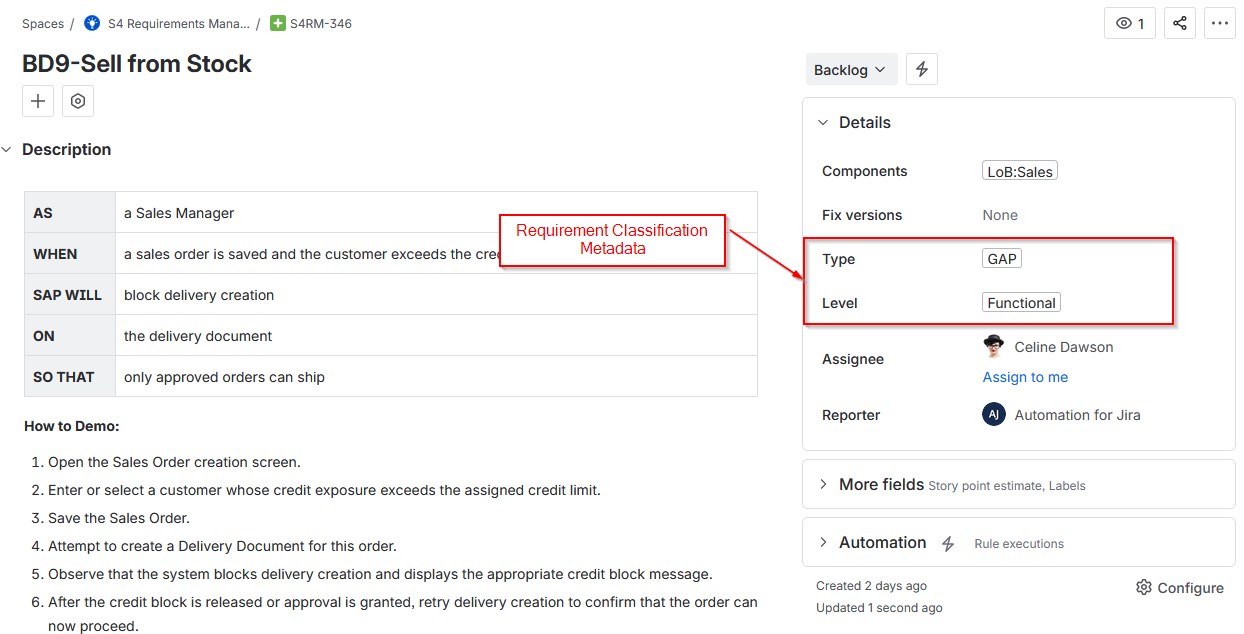
R2D ALM for Jira - Requirement Work Item screen view
Standardized metadata enables filtering, reporting, and building reporting dashboards by type, level, or workstream, giving full transparency into project and solution scope composition.
Even that simple setup unlocks powerful reporting: dashboards showing % FIT coverage, distribution of GAPs and WRICEFs, or NFR readiness by release. Your backlog becomes a live dashboard, not a static list in Excel.
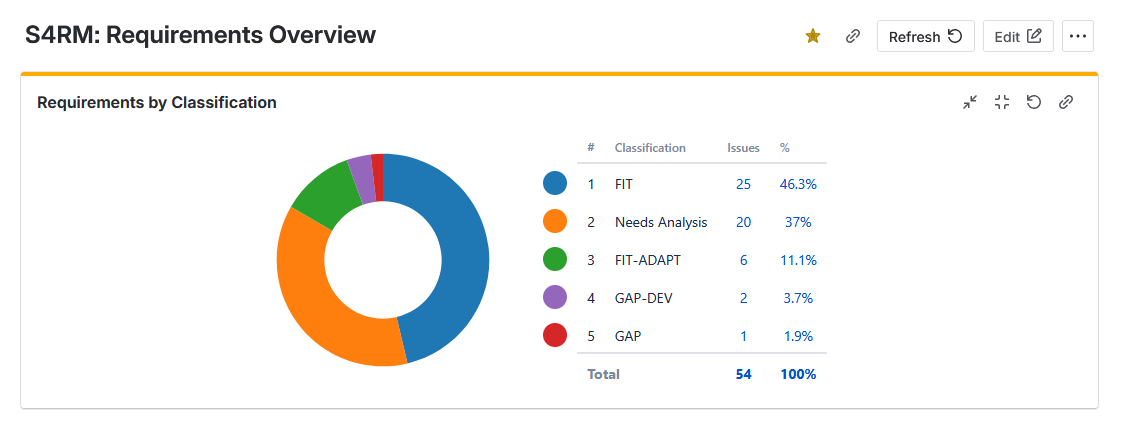
R2D ALM for Jira - Requirement Classification dashboard element
What’s in it for you?
Just like requirement formulation standard discussed here, clarity is again about bringing structure and governance to requirements management. When every requirement has its place and type, governance stops being a reporting exercise and becomes a shared language. Classification is not overhead or project administration - it is the structure that keeps delivery, design, and testing aligned, supports compliance, and maintains clear documentation from the first workshop to go-live.
And the question If I opened your requirements tracker today (I hope it is Jira) and picked five random requirements, would I instantly see what each one means, what type of work it implies, and where it fits in your process? If not, you know now what to do.
