
I think all of SAP project experts will agree that SAP Requirements Management is much more than an Excel file downloaded from the SAP Activate Roadmap accelerators list and filled with unstructured notes from Fit-2-Standard workshops. In practice, Requirements Management should be the bridge between business intent and tested, working functionality. And yet, this bridge often does not exist. The disconnect between what business processes should do and what finally goes live remains one of the biggest causes of rework and missed value in SAP programs.
Why managing requirements is important?
A weak requirements discipline leads later to solution scope creep, fragmented testing, and the famous “this isn’t what we expected” moment during the UAT. Well organized requirements management turns conversations into commitments - every requirement becomes traceable from the "Need" through "Realize and Test" to "Deploy". Traceability is the essence of governance in SAP Activate.
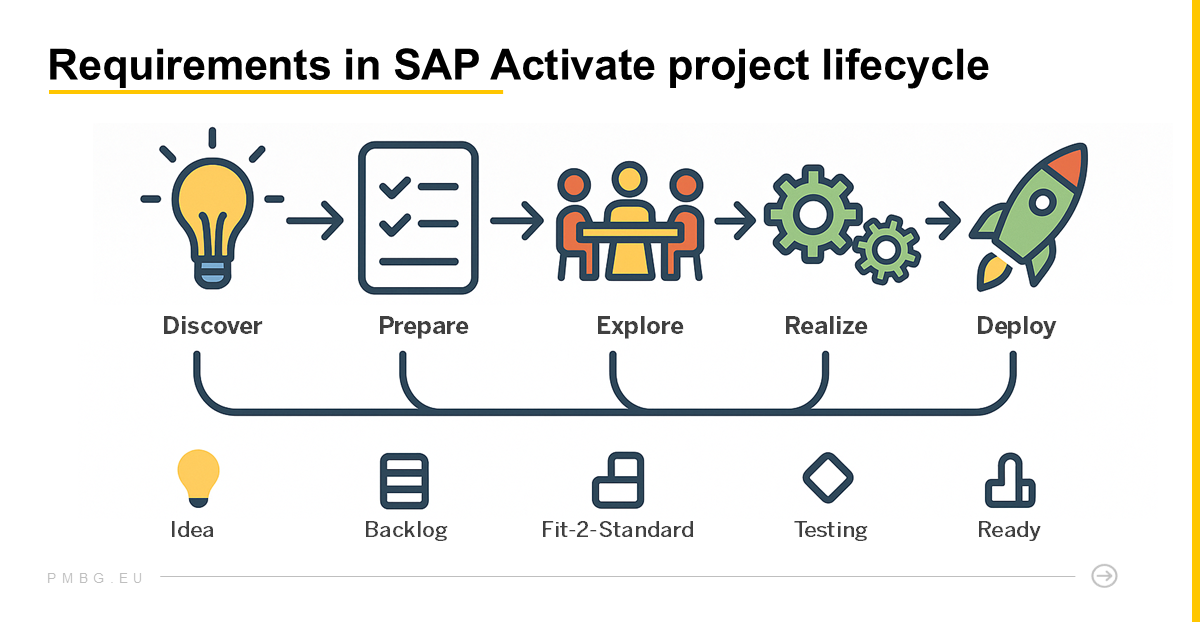
High-level business outcomes are defined during Discover and Prepare, while detailed functional, non-functional, and delta requirements are refined and documented during the Explore phase. They are documented against SAP Best Practice processes (for example BD9 - Sell from Stock).
Every requirement should be linked to its related Test Case and Work Package to ensure full traceability from Fit-to-Standard through Deployment. This linkage keeps it transparent, testable, and aligned with business value.
How SAP Activate Defines a Requirement
In the Requirements-to-Deploy (R2D) framework, a requirement is a single, testable statement describing the system behavior or capability needed to fulfill a business need.
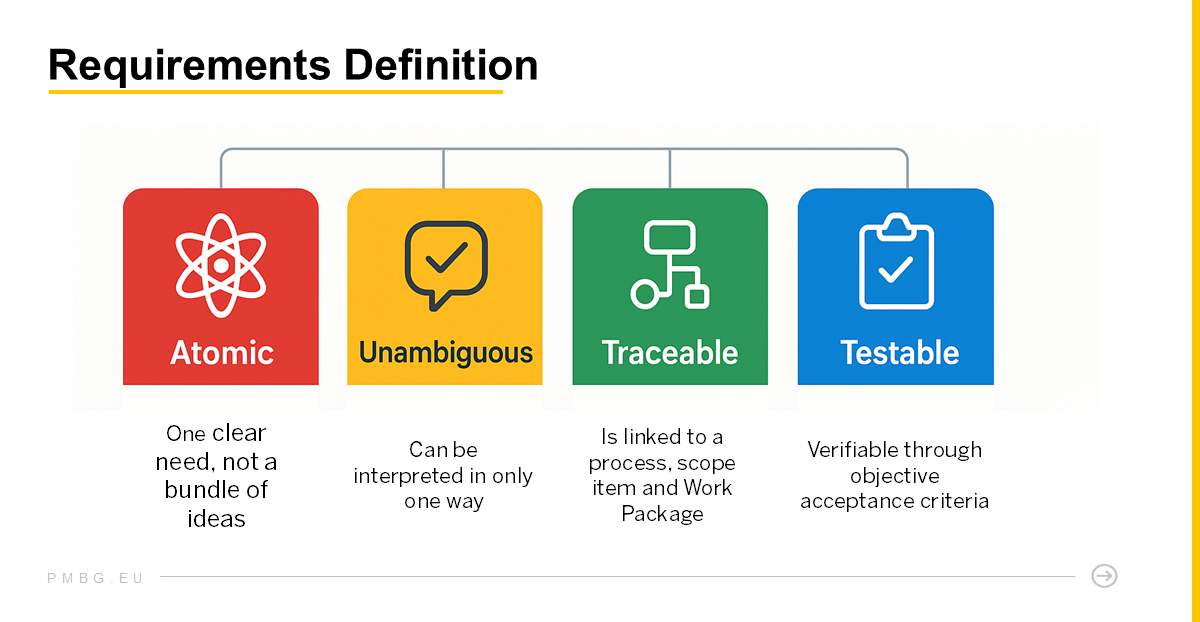
Each requirement should be defined in a specific way:
- Atomic – one clear need, not a bundle of ideas.
- Unambiguous – can be interpreted only in one way.
- Traceable – linked to a Process, Scope Item and Work Package (deliverable).
- Testable – verifiable through objective criteria.
A requirement is not a meeting note like ‘Need better reports’. It states precisely what the SAP system must do. It defines what the system must achieve but not yet how to implement it.
When written in a standardized way, requirements become the shared language between Business and IT - the foundation for alignment, testing, and auditability.
Practically in Jira
Ok, so if it is now clear what a requirement is and how it should be defined, the next question becomes where to manage it effectively. That’s where Jira - when properly configured - becomes a practical backbone for collecting, tracking, and processing SAP requirements.
In Jira, requirements can be managed as custom Work Item types aligned with SAP Activate governance and Focused Build standards.
- Create a dedicated work item type called Requirement with a distinct icon.
- Configure essential fields and workflow statuses (e.g., Backlog → To Be Approved → Approved → In Realization → Completed).
- Link each requirement to its Scope item, ensuring full traceability.
Once configured, you can collect requirements directly in Jira during your Fit-To-Standard workshops.
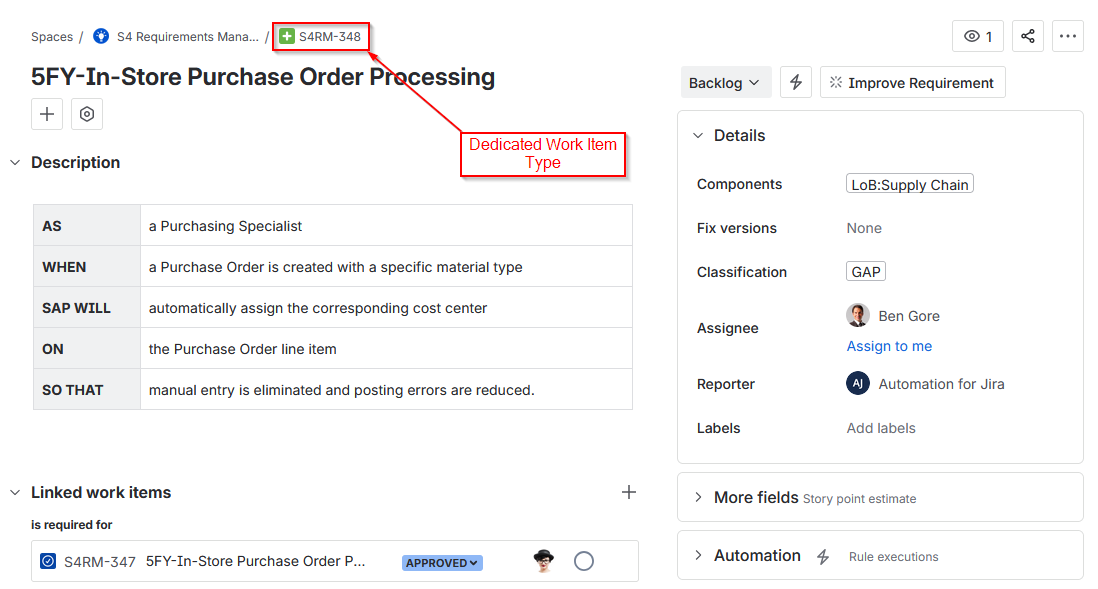
R2D ALM for Jira - Requirement Work Item screen view. Right-click and open the image in a new tab for a more detailed view.
SAP native tools
While SAP Cloud ALM and Solution Manager’s Focused Build provide strong governance for Requirement-to-Deploy processes, many organizations still complement them with Jira to enable broader Agile methods delivery, integrate non-SAP workstreams, and leverage its native links with Confluence and Test automation tools. Also, there are a few integration tools available that allow for data exchange between Jira and SAP.
Your Goal
In any SAP project, your goal is to ensure that every piece of delivered and tested functionality traces back to at least one well-written requirement. However, the discipline lies not in the tool itself but in the governance structure and consistency with which it’s used.
